
Freedom. Fair play. Respect.
Adults and kids share this world. Adventure boldly, play fairly, and remember there is a real person behind every character.
Community rules
- Minecraft’s rules apply. Follow the Minecraft / Mojang Community Standards and applicable platform rules.
- Keep language kid appropriate. No slurs, hate speech, sexual content, threats, or offensive chat, signs, skins and builds. No spam, scams or sharing someone else’s private information.
- PvP and griefing are allowed within these limits. Unprotected builds may be raided or damaged, and players may fight. Do not repeatedly target the same person, trap them in a cycle of attacks, bully them or evade protection systems.
- Real-life harassment is a serious violation. Harassment or bullying outside the game connected to server play can result in an immediate, permanent ban.
- No cheating. No flight cheats, speed modifications, X-ray or other unfair advantages. Normal Survival mechanics, including elytra flight, are allowed. Players caught cheating will be punished.
- Keep the server playable. Do not intentionally cause lag or crashes through redstone, excessive entities or farms. High-output farms, including silverfish XP farms, are allowed, but use them cautiously and stop if they affect performance. Email the admin immediately if your activity causes a crash. Repeated offenders may have their accounts limited.
- Respect shared routes. Players cannot claim inside the 150 × 150-block square centered on 0,0 (75 blocks in each horizontal direction). The three-block-wide highway and a one-block buffer on each side are also off-limits to player claims in all eight directions. Keep shared routes open.
- Survival losses generally stay lost. Requests to reset a player or restore lost items after a major loss—such as falling into lava while carrying 100 diamonds—will generally not be granted. Losing items is part of Survival, so plan ahead and protect your valuables. This is separate from the admin’s discretionary restoration of major builds damaged by griefing.
- Normal difficulty & regular updates. The server difficulty will be set to Normal: hostile mobs and Survival hazards are part of the experience. We will update the server version as frequently as possible, allowing time to confirm that essential plugins and Java/Bedrock connections remain compatible. Check the Play page for the supported version before connecting.
- Ask for help responsibly. Email the admin with your username, coordinates, time and a description of an incident. Major griefing of major builds may be reset on request at the admin’s discretion. Consequences may include restrictions or bans, depending on severity and repetition.
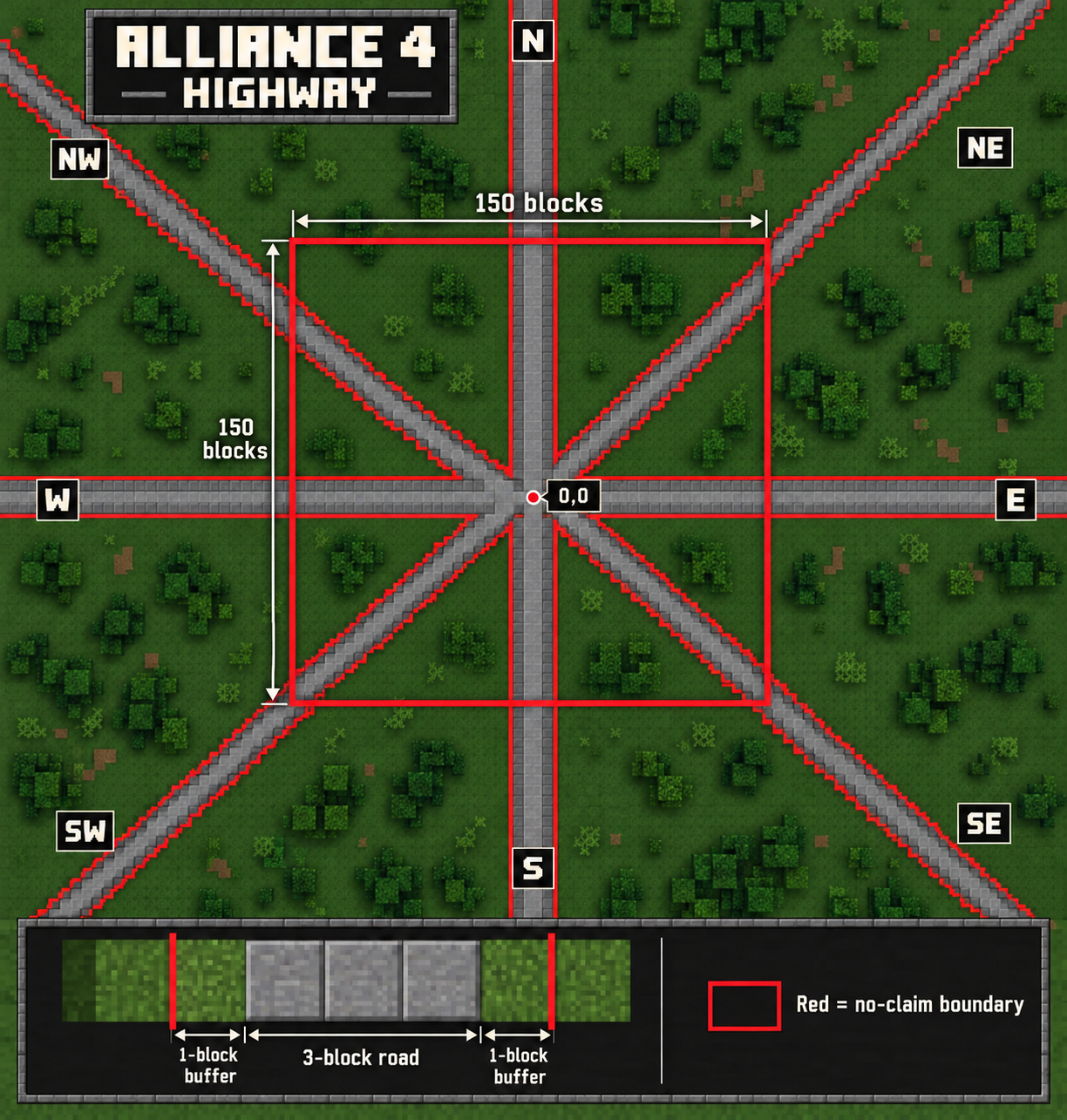
The central square extends 75 blocks each way from 0,0 (150 × 150 blocks total). Roads are three blocks wide, with a one-block no-claim buffer on each side.
Claiming & protecting your land
Your first claim
Place your first chest in eligible, unclaimed land to create your protected starter claim. With the default setting, it extends four blocks from the chest in each horizontal direction, forming a 9 × 9-block square. Check the boundary markers and confirmation message; don’t assume your whole build is protected. Claims cannot overlap another claim or the reserved spawn/highway areas.
Create, inspect & resize
Hold a golden shovel and right-click a ground block to select the first corner. Walk to the diagonally opposite corner and right-click again to finish. Both selections use right-click; left-click does not finish the claim. Claim blocks are your land-area allowance; larger claims require more. Right-click with a stick to inspect ownership and reveal boundaries. To resize, hold the golden shovel, right-click an existing corner, then right-click its new location. Watch the confirmation messages and keep all of your build within the borders.
Share carefully
Inside your claim, use /trust PlayerName for building access, /containertrust PlayerName for container access, or /accesstrust PlayerName for basic access. Use /trustlist to review permissions and /untrust PlayerName to remove them.
Subdivide or remove
Use /subdivideclaims and the shovel to create smaller permission areas inside your claim; return with /basicclaims. Standing inside a claim, /abandonclaim removes its protection. Unclaiming leaves that area exposed. Check messages before confirming any removal.
Controls may differ on Bedrock. See the GriefPrevention command reference or ask the admin for help.